
IRB Manager
Applications for IRB review, including new applications, amendment requests, progress reports/continuing review requests, final reports, and adverse/reportable events reports must be submitted through our web-based application portal called IRBManager (login link is below).
Please read the information on our Application Information page before submitting an application for IRB review.
Click on the image below to view a figure that describes the different steps in the IRBManager application process:
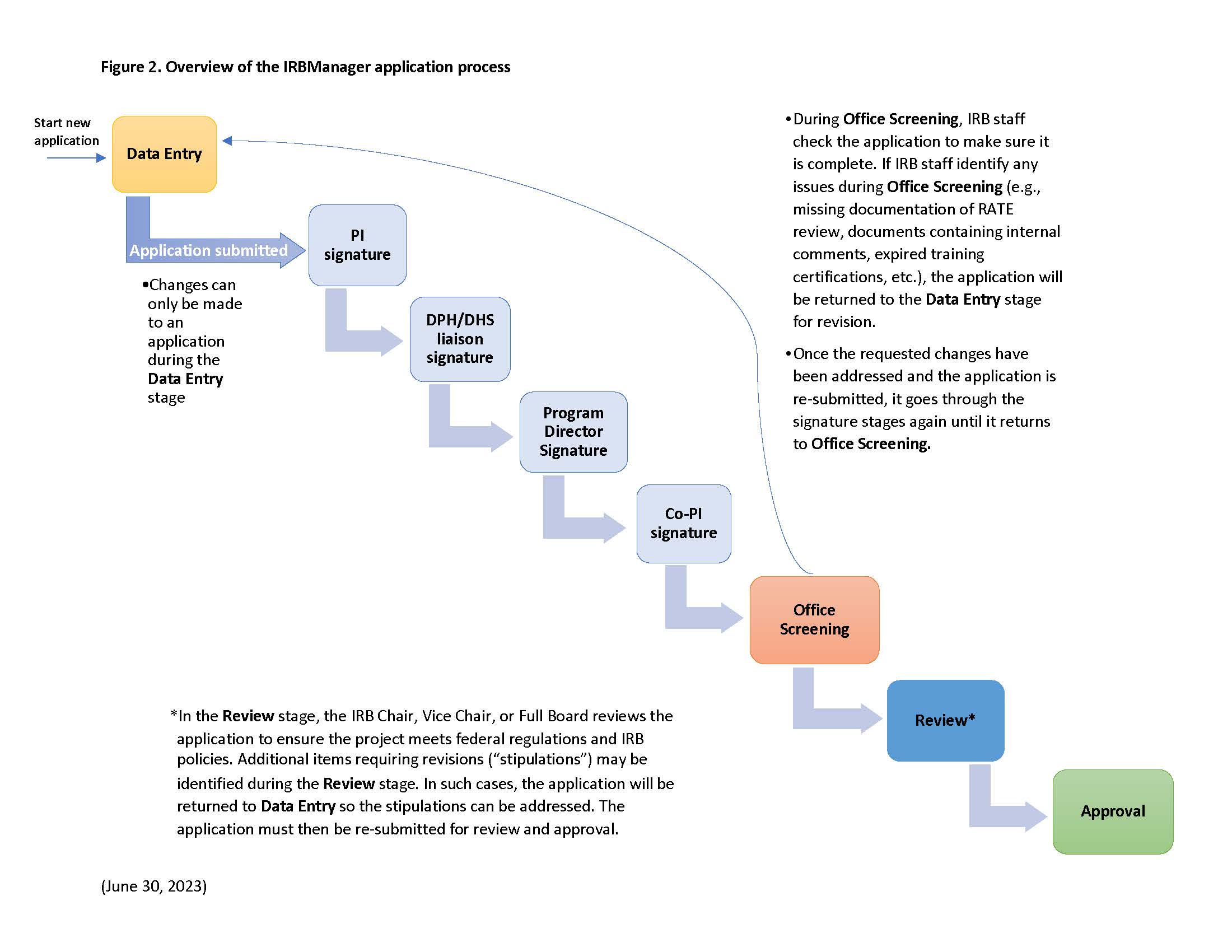
Overview of the IRBManager Application Process
When you are ready to submit your application, click the following link to access the IRBManager login page:
If you encounter any technical difficulties while using IRBManager, please contact the IRB via email and we will respond to your inquiry within 3 business days.
Click on the image below to open a User Guide with instructions for using IRBManager:
Tutorial Videos
We created several YouTube videos that walk you through the various functions described in the User Guide linked above. The corresponding section of the User Guide is listed in parentheses next to the name of the video. Please click on the links below to view the videos; in some cases you may need to copy the url and paste it in the search bar of your internet browser.
Navigating Your Dashboard(Section 2)
Submitting a New Application (Section 3)
Creating a New Contact (Section 4)
Changing Settings and Logging Off (Section 5)
Amendments, Annual Progress Reports, and Continuing Review Requests (Section 6)
Uploading Documents as Attachments (Section 8)
Checking the Status of Applications (Section 10)